
Hitachi ID SOAP API – Automate Website Login Using Python
Published March 21, 2018
Insight summary and table of contents
Summary
Contents
In the realm of password management, automating repetitive tasks can significantly boost efficiency. At IDMWORKS, we delve into the intricacies of making SOAP API calls using Python, particularly focusing on the Hitachi ID SOAP API to automate website logins.
Introduction to Python SOAP
Python SOAP provides a robust way to interact with web services. By leveraging SOAP API with Python, developers can automate complex tasks such as logging into websites, managing passwords, and retrieving data. This method is particularly useful for businesses that require high levels of security and efficiency.
Making SOAP API Calls Using Python
To get started with making SOAP API calls using Python, you need to understand the basics of SOAP and how it integrates with Python. Python libraries like zeep make it straightforward to send and receive SOAP messages. Here’s a simple example of how to initiate a SOAP API call using Python:
How to Automate Website Login with Hitachi ID SOAP API
The Hitachi ID SOAP API is a powerful tool for automating tasks related to identity and access management. By using this API, you can automate the process of logging into websites, thereby streamlining your password management workflow. Here’s how you can use Python SOAP to automate website login:
- Initialize the Client: Start by setting up the SOAP client with the Hitachi ID SOAP API WSDL file.
- Send Login Request: Use the client to send login requests with the necessary credentials.
- Handle Responses: Process the responses to ensure successful login and manage session tokens if needed.
In order to make multiple SOAP calls to the Hitachi ID web services, the Login function is required so as to establish a session on the Hitachi ID Server with a supplied ID and Password. The login process uses the authentication list configured through the PSA console. Below is the general form of the input and output for a login function
Request:
<LoginRequest>
<userid>...</userid>
<password>...</password>
<isadmin>...</isadmin>
<options>...</options>
<sessdat>...</sessdat>
</LoginRequest>
Response:
<LoginResponse>
<errmsg>...</errmsg>
<rc>...</rc>
<sessdat>...</sessdat>
</LoginResponse>
Prerequisite
● Hitachi ID Suite 10.x and above
● Python
Process
Setup API SOAP Service(idapisoap) - This service provides access to the Hitachi ID Suite API Service(idapi) with the WWS web service API. It is automatically installed and started on the Hitachi ID Suite server during setup. For more information on this refer to the Hitachi ID IDAPI documentation
Confirm that WSDL is accessible - Launch a compatible browser on the Hitachi ID Suite Server and navigate to the following URL : https://<ServerName>/<instanceName>/idapi/wsdl . The web service WSDL should be returned confirming that the SOAP service is running.
Create a user with IDAPI Caller privilege - This user account will be used to authenticate into the instance of the Hitachi ID Suite hosting the Web service.
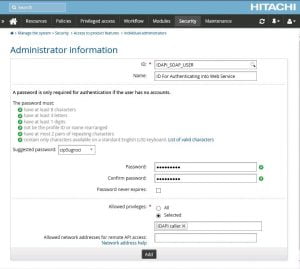
Execute the following Python script -
from zeep import Client
from idmlib.components import component_log

log = component_log.getChild(__name__)

class IDAPI_SOAP_WEBSERVICE:

    def __init__(self):
        self.instancename = '<INSTANCENAME>'
        self.servername = '<SERVERNAME>'
        self.sessdat = None
        log.info('starting SOAP Client...')
        wsdl = 'https://{}/{}/idapi/wsdl'.format(self.servername, self.instancename)
        log.info('wsdl : ' + wsdl)
        self.iw =  Client(wsdl=wsdl)

    def login(self):
        log.info('start Login...')
        request_data = {
            'userid': 'IDAPI_SOAP_USER',
            'password': '******',
            'isadmin': 1,
            'options': '',
            'sessdat': self.sessdat
        }
        return self.iw.service.Login(request_data)

    def logout(self, sessdat):
        log.info('start Logout...')
        request_data = {'sessdat': sessdat}
        return self.iw.service.Logout(request_data)

#login, get sessdat
print('logging in.......>')
loginresponse = IDAPI_SOAP_WEBSERVICE().login()
print(loginresponse)

#logged in,
print('Getting session data')
sessdat = loginresponse['sessdat']
print(sessdat)

#logout, send sessdat
print('loging out <.......')
logoutresponse = IDAPI_SOAP_WEBSERVICE().logout(sessdat)
print(logoutresponse)
Once the Login function is successfully called, a session data is returned which can then be used in subsequent operations as shown in the logout function code above.
Benefits of Using SOAP API with Python
- Efficiency: Automating login processes saves time and reduces manual effort.
- Security: Ensures secure handling of credentials and sensitive information.
- Scalability: Easily scalable for multiple websites and applications.
Conclusion
The Web Service API could be further programmed to filter incoming Web Service calls based on the user making the call or operations being requested, applications making the call and more.
Utilizing Hitachi ID SOAP API for automating website logins using Python SOAP is an excellent way to enhance your password management system. It offers a secure, efficient, and scalable solution for managing repetitive tasks. Contact IDMWORKS today to learn more about our services and how we can help you implement SOAP API with Python.